The ultimate Windows clean-up and optimization tool
Ashampoo WinOptimizer15 helps you keep your system perfectly optimized for full performance in a very easy way.
This Windows tweaker and optimizer is designed to provide you with professional results even if you have little knowledge about system tweaking. Ashampoo WinOptimizer 15 features a nicely-designed interface and lots of useful tools, all conveniently organized into different categories. There's also a tab for Favorites, though you can't customize them: they seem to be automatically selected according to the number of times you've run each tool in Ashampoo WinOptimizer.
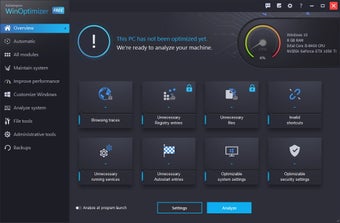
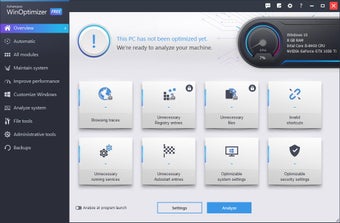
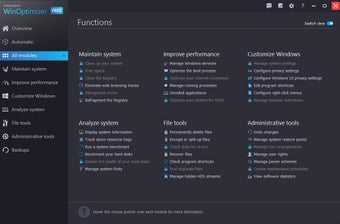
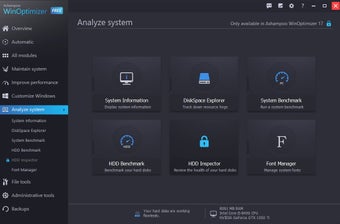
The main screen in Ashampoo WinOptimizer 15 displays a summary with basic system information and the current maintenance status. Clicking the Main menu button on top of the window opens up a menu with all the program’s tools, with which you can clean the drive, optimize the Registry, tune up system startup, check active processes, securely delete files, and perform a system benchmark, among many other options.
All the tools included in Ashampoo WinOptimizer 15 feature a clean design and are very easy to use. There is also a handy One-Click Optimizer that performs a quick scan and clean routine.
With Ashampoo WinOptimizer 15 you can effectively increase the speed and performance of your system in just a few clicks.
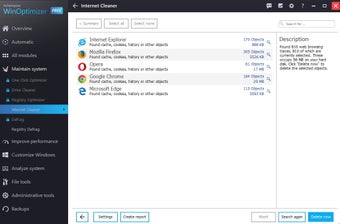
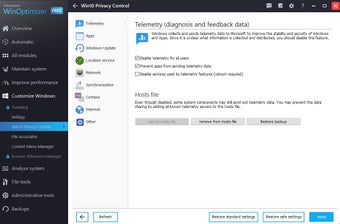
Ashampoo WinOptimizer 14 is a powerful system optimization software. It automatically frees up disk space, fixes errors and tunes your machine for best performance. Privacy protection and Windows customization are also supported. Aside from 3 cleaner modules that clean your Windows system effectively, over 30 tools cover everything from system maintenance, tweaking, analysis and performance tuning to file processing. Version 14 comes with AutoClean to delete web browsing traces, program leftovers and temporary files automatically as soon as their host applications are closed. The updated cleaning algorithms now support all the latest browsers (including MS Edge) and will clean your machine from no longer needed Java and Flash objects as well as many other file types. Win10 Privacy Control provides added privacy protection on Windows 10 systems by individually preventing services and functions from sending out usage data. Modules such as IconSaver, Internet Tuner, System Information and various others have also been updated for better usability and performance.
Highlights:
- Automatic deletion of web browsing traces and temporary files
- Optimal privacy settings for Windows 10
- Reliable system failure warnings
- Fix Windows errors with a single click
- New look for maximum clarity
- System analysis with support for the latest hardware
- Full Microsoft Edge support
- Newly developed Internet cleaner with multi-user support
- Updated search algorithms for all cleaner modules
- Full performance through effective system tuning
- More than 30 modules for the perfect Windows system
Great tool, thanks Ashampoo :-). This easy-to-use suite of tools for maintaining and optimizing my computer. It keeps my Windows installation free of unnecessary garbage and running smoothly while other computers just get slower and slower. :-)
Anonymous user
Long term user of Winoptimizer. With ease of installation and simplicity of use on a regular basis, particularly with the 'One Click' function, I found this to be a very useful comprehensive program to keep and maintain my computer running smoothly at all times. The result is that I have so far, never experienced any of the problems apparently encountered other users of Windows. Over the last 4+ years I have had the all of various upgraded versions of WinOptimizer (since V.3) running on many Windows 2000, XP and currently Vista Operating Sytems, all of which in my experience, have been sucessful Pros: Simple to use.Regular updates Cons: I'd like to see a better 'User Interface' on Deframenter, to include estimated completion time to help to better manage time taken to complete this process. Also a 'retrospective' disk File Deletion function of files previously ordinarily deleted.
Anonymous user
Compatibility issue with Windows 7. This program seems to work very well with Windows XP, but when I try to run it with Windows 7, I get a message saying that the program has not been certified for this version of Windows, and won't run at all, which seems rather strange to me as I have absolutely no problems running Winoptimizer 5 on either Windows 7 or XP. The Ashampoo team needs to get up to speed and have this program certified ASAP, so that those of us who have purchased it can actually use it and rate it on the new Windows 7, since this will be the operating system in the very near future. Pros: Great with Windows XP. Cons: Unable to be used yet with Windows 7.
Anonymous user
WinOp 6. I have only just installed this but it looks good and no doubt this will get good reviews from people more skilled in this field than me. Pros: I like the One Click operation
Anonymous user
It i verry Good program. It i verry Good program I will haapy to with this prgram!It i verry Good program I will haapy to with this prgram!
Anonymous user
Thank You for the Birthday gift.. I tried it yrs ago ,and I liked it It was a bit slow ,but my P.C. ,wasn't great . please end me the aiti virus & spy ware kit . does your win opt #6 cover all ? . I want to buy after Fr ee trial Dwn Load ? Thank you Mr J Dunne.
Laws concerning the use of this software vary from country to country. We do not encourage or condone the use of this program if it is in violation of these laws. Softonic may receive a referral fee if you click or buy any of the products featured here.